 by
by 1. The Real End-to-End Pipeline
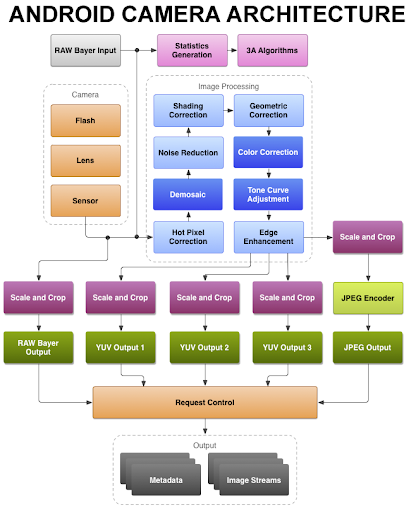
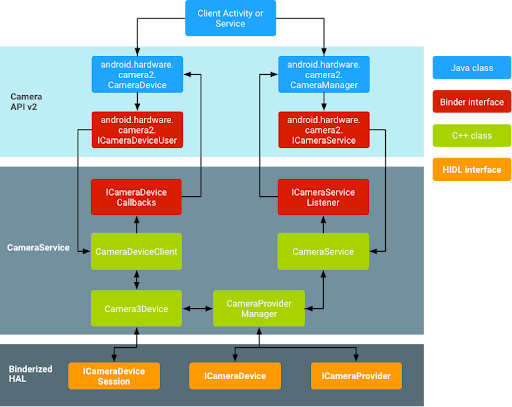
At a high level, the Android camera stack looks simple:
Application → Framework → CameraService → HAL → ISP → Sensor
But what matters is not the layers — it’s the fact that every boundary is asynchronous.
Requests are pipelined.
Results are asynchronous.
Multiple frames are in-flight simultaneously.
By the time a shutter press occurs, several preview frames may already be queued inside the ISP pipeline.
This is why camera systems behave like streaming systems — not function calls.
2. The Request/Result Boundary (HAL3 Model)
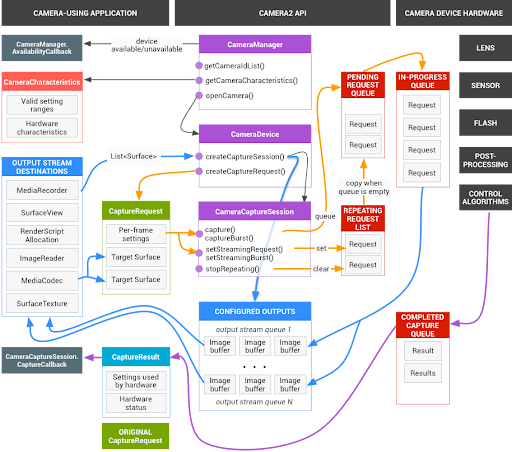
HAL3 operates on a strict request/result contract:
- Framework submits CaptureRequest
- HAL processes asynchronously
- HAL returns buffers + metadata
Important realities:
- Results may arrive out of order
- Partial metadata may precede full metadata
- Multiple requests are processed concurrently
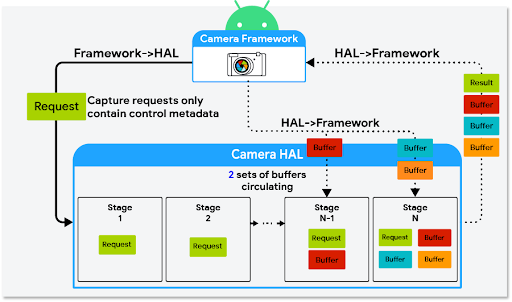
If buffer handling blocks inside HAL, the entire pipeline backs up.
This is where many production issues originate.
3. Preview Buffer Flow and Latency Accumulation
Preview frames do not jump from ISP to screen.
They flow through:
Sensor → ISP → HAL → BufferQueue → SurfaceFlinger → Display
Each stage introduces:
- Buffer allocation
- Fence synchronization
- Scheduling delay
- Potential blocking
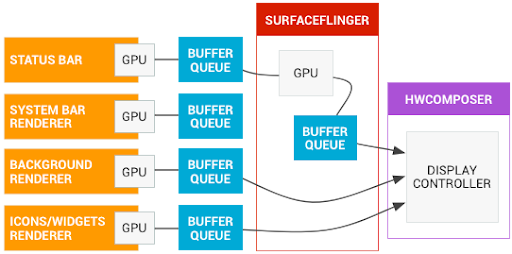
If BufferQueue depth = 5
Frame time = 16 ms
That alone introduces ~80 ms latency.
Preview “feels slow” not because of CPU load — but because of queue depth and synchronization.
4. Backpressure and Frame Drops
If the consumer (GPU / SurfaceFlinger) is slow:
- Queue fills
- Producer blocks or drops frames
- Latency increases
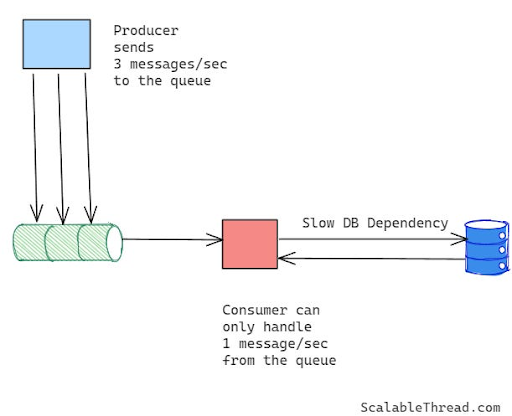
Design choices:
Deep queue → stable but laggy
Shallow queue → responsive but sensitive to stalls
For preview systems:
Fresh frames > Every frame.
5. Multi-Camera Resource Contention
Modern devices support:
- Wide
- Ultra-wide
- Tele
- Depth
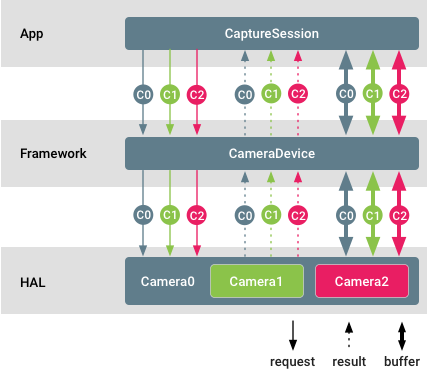
But they often share:
- ISP bandwidth
- Memory pools
- Synchronization primitives
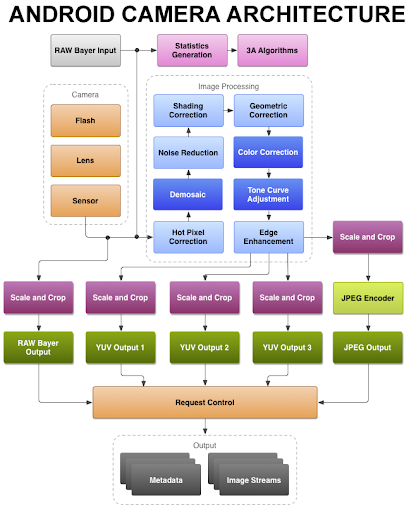
Switching cameras is not just selecting a new sensor. It requires:
- Stream teardown
- Buffer reallocation
- ISP reprogramming
- 3A reset
If pipeline drain is not handled carefully, you get:
- One-frame black preview
- Temporary freeze
- Delayed AE convergence
Most “random camera glitches” are deterministic pipeline transitions.
Final Engineering Insight
The Android camera stack is complex because of:
- Asynchronous execution
- Buffer ownership transfer
- Synchronization fences
- Shared hardware resources
Written by Md Naseef Ur Rahman Chowdhury, this article gives a rare inside look at how real Android camera systems behave outside the lab. From pipeline bottlenecks to those tiny bugs that suddenly break everything in production, his experience shows the reality engineers face every day.
If you enjoyed this deep dive, stay connected for more practical insights on camera software, mobile imaging, and real-world debugging stories.